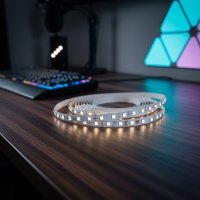
Smart LED strip lights are flexible, vibrant ribbons of light that integrate into smart home ecosystems, offering unparalleled control and customization for home and outdoor illumination. They allow users to change colors, dim brightness, set scenes, and synchronize with music, all controlled via smartphone apps or voice commands through Wi-Fi or Bluetooth connectivity. These lights transform spaces by creating dynamic atmospheres, enhancing aesthetics, and providing practical lighting solutions for various applications.

What Makes Smart LED Strip Lights So Smart?
The “smart” in smart LED strip lights isn’t just a marketing buzzword; it’s a whole universe of possibilities. Unlike traditional LED strips, these intelligent lights integrate seamlessly into your digital life, offering unparalleled control and customization.
Beyond Basic Lighting: Color Changing, Dimming, Scenes, and Synchronization
Imagine waking up to a gentle, warm glow that slowly brightens like a sunrise, or transforming your living room into a vibrant party zone with lights pulsating to your favorite music. Smart LED strips do all that and more. With millions of color options, precise dimming capabilities, and pre-set scene modes, you can craft the perfect ambiance for any moment. Many even offer music synchronization, turning your room into a dynamic light show that dances to the beat.
Connectivity: Wi-Fi, Bluetooth, and Smart Home Ecosystems
The magic truly happens through connectivity. Most smart LED strip lights connect via Wi-Fi or Bluetooth, allowing you to control them from an app on your smartphone, even when you’re not home (with Wi-Fi). Many are also compatible with popular smart home ecosystems like Amazon Alexa, Google Home, and Apple HomeKit, enabling voice control – just imagine saying, “Alexa, dim the kitchen lights!” Some high-end systems, like Philips Hue, use a Zigbee bridge for even greater reliability and expanded features.
Types of Smart LED Strips: RGB, RGBW, RGBIC, Tunable White, and COB
- RGB (Red, Green, Blue): These are the classic color-changing strips, offering a vast spectrum of hues. However, their “white” light is often a mix of all three colors, which can appear somewhat bluish.
- RGBW (Red, Green, Blue, White): Adding a dedicated white LED, RGBW strips provide truer, more natural white light alongside the vibrant colors, making them more versatile for everyday use.
- RGBIC (Red, Green, Blue, Independent Control): This advanced type allows individual segments of the strip to display different colors simultaneously, creating stunning rainbow effects and intricate light patterns. Think of it as multiple mini light strips in one.
- Tunable White: These strips focus solely on white light but allow you to adjust the color temperature from a warm, cozy glow (around 2700K) to a cool, crisp daylight (up to 6500K), perfect for adapting to different tasks or times of day.
- COB (Chip-on-Board): COB LED strips feature a higher density of tiny LED chips, which creates a more uniform, dot-free light output, giving a smooth, continuous line of illumination, often preferred for a sleek, modern aesthetic.
Choosing the Right Smart LED Strip Lights for Your Home
With so many options, picking the perfect smart LED strip light can feel like navigating a maze. Here’s what to to find your ideal match.
Key Features to Consider: Brightness, Color Accuracy, Length & Flexibility, Durability (IP Rating)
|
Our Picks for the Best LED Strip in 2026
As an Amazon Associate I earn from qualifying purchases.
|
||
| Num | Product | Action |
|---|---|---|
| 1 | KANTUTOE LED Lights for TV, 16.4ft LED Lights for 45-75 Inch TVs, RGB TV Backlight Behind, Music Sync Bluetooth APP & Remote Control Strip Lights USB Powered for Bedroom, Gaming, Home Décor |

|
| 2 | Govee Smart RGB LED Strip Lights for Bedroom, 32.8ft WiFi LED Light Strip Work with Alexa Google Assistant, 16 Million Colors with App Control and Music Sync Lights for Home Decor, 2 Rolls of 16.4ft |
|
| 3 | KSIPZE 100ft Led Strip Lights RGB Music Sync Color Changing Led Lights with Smart App Control Remote Led Lights for Bedroom Room Lighting Flexible Home Décor |
|
| 4 | Govee Warm White LED Strip Lights, Bright 300 LEDs, 3000K Dimmable Light Strip 16.4ft with Control Box, LED Lights for Bedroom, Kitchen Cabinets, Living Room, ETL Listed Adapter Included |
|
| 5 | Govee RGBIC LED Strip Lights, Smart LED Lights for Bedroom, Bluetooth LED Lights APP Control, DIY Multiple Colors on One Line, Color Changing LED Strip Lighting Music Sync, Home Decor, 16.4ft |
|
| 6 | VOEWT LED Neon Lights Daylight White 6000K,9.8ft 110-120V LED Strip Lights,Flexible Outdoor Waterproof Neon Rope Lights for Bedroom,Cabinet,Kitchen,Living Room,Mirror,Halloween Decor |
|
| 7 | Aclorol LED Strip Lights 5V USB 6.56FT/2M 640 LEDs Blue Indoor Rope Lights for Bedroom Not Waterproof IP20 CRI85+ Flexible LED Light for TV Backlight Living Room Party DIY Lighting |
|
| 8 | Tenmiro Led Lights for Bedroom 100ft (2 Rolls of 50ft) Music Sync Color Changing Strip Lights with Remote and App Control RGB Strip, for Room Home Party Decoration |
|
| 9 | Govee 100ft RGBIC LED Strip Lights, Smart LED Lights Work with Alexa and Google Assistant, LED Lights for Bedroom WiFi App Control Segmented DIY Multiple Colors, Color Changing Light, (2 x 50ft) |
|
| 10 | Govee RGBIC LED Strip Lights, 32.8ft Smart LED Lights for Bedroom, Bluetooth LED Lights APP Control, DIY Multiple Colors on One Line, Color Changing LED Strip Lighting Music Sync, Home Decor |
|
- Brightness (Lumens): Consider how bright you need your lights to be. For accent lighting, lower lumens are fine, but for task lighting (like under kitchen cabinets), you’ll want higher lumen output. Look for specifications measured in lumens per foot or meter.
- Color Accuracy: If natural white light is important to you, opt for RGBW or RGBWW (Red, Green, Blue, Warm White, Cool White) strips, which have dedicated white diodes for better fidelity.
- Length & Flexibility: Measure your space accurately. Most strips can be cut at marked points, and some can be extended with connectors. Ensure the strip’s flexibility matches your installation needs, especially if you have tight corners.
- Durability (IP Rating): For bathrooms, kitchens, or outdoor applications, an IP (Ingress Protection) rating is crucial. Look for IP65, IP67, or IP68 ratings for protection against dust and water. Indoor strips typically have lower or no IP ratings.
Hub vs. Hub-less: Which is Right for You?
- Hub-less Systems: These connect directly to your home Wi-Fi or via Bluetooth. They are often simpler and more affordable to start with, requiring no extra hardware. Brands like Govee and TP-Link Tapo often offer hub-less options.
- Hub-based Systems: Brands like Philips Hue utilize a central hub (bridge) to communicate with your lights via a more robust protocol like Zigbee. While an initial extra cost, hubs generally offer greater reliability, wider range, and more advanced automation features, especially for larger smart home setups.
Top Brands in the Smart LED Strip Market
The market is buzzing with innovative brands. Govee is known for its vibrant RGBIC technology and feature-rich app. Philips Hue is a premium choice, offering exceptional color quality, reliability, and extensive smart home integration. Nanoleaf stands out for its unique modular designs and bright output. Other reputable brands include LIFX, TP-Link Tapo, and Sengled, each offering a unique blend of features and price points.
Easy Installation: A Step-by-Step DIY Guide
Installing smart LED strip lights is surprisingly straightforward, making it a fantastic DIY project for transforming any room.
Gather Your Tools Checklist
Before you begin, gather these essentials:
- Smart LED strip lights (with power adapter and controller)
- Measuring tape
- Sharp scissors (specifically for cutting LED strips)
- Rubbing alcohol and a clean, lint-free cloth
- LED strip connectors (if cutting and rejoining)
- Mounting clips (optional, for extra security)
- Screwdriver (if using mounting clips)
- Pencil
Planning Your Layout for Perfection
A little planning goes a long way! Measure the area where you intend to install the lights. Sketch out your route, noting any corners or obstacles. Think about where the power source is and how you’ll discreetly run the cables. Visualize the final effect – do you want direct lighting, or a subtle glow from behind furniture?
Surface Prep: The Foundation of a Lasting Install
This step is critical for good adhesion. Use rubbing alcohol and a clean cloth to thoroughly clean the surface where the strip will be mounted. Remove any dust, grease, or grime. Allow the surface to dry completely before proceeding. A clean, dry surface ensures the adhesive backing sticks firmly and lasts.
Cutting and Connecting: Precision is Key
Most LED strips have designated cut lines, usually marked with a small scissor icon or copper pads. Only cut along these marked lines to avoid damaging the circuit. Use sharp scissors for a clean cut. If you need to connect multiple strips or navigate corners, use specialized LED strip connectors. These typically snap onto the copper pads, creating a secure electrical connection. For a more permanent solution, you can also solder connections, but this requires more advanced skills.
Peel, Stick, and Secure
Once your surface is ready, peel off a small section of the adhesive backing from the strip and begin pressing it firmly into place. Work in small sections, applying gentle, even pressure as you go. For longer runs, or on surfaces where adhesion might be tricky, use adhesive mounting clips every few feet for added support.
Powering Up and Syncing with Your Smart Home
Connect your LED strip to its power adapter, and then plug it into a power outlet. If your strip comes with a physical controller, test it to ensure the lights turn on and respond. For smart strips, download the manufacturer’s app and follow the in-app instructions to pair your lights with your smartphone and integrate them with your chosen smart home ecosystem (Alexa, Google Home, Apple HomeKit). This usually involves connecting to your Wi-Fi network or Bluetooth.
Creative Applications: Unleash Your Inner Lighting Designer
Smart LED strip lights are incredibly versatile, offering endless possibilities to enhance your home’s aesthetics and functionality.
Kitchen & Dining: Under-Cabinet & Ambient Glow
Illuminate your countertops with under-cabinet LED strips for excellent task lighting while cooking. They also add a sophisticated, modern ambiance to your kitchen and dining areas, perfect for entertaining guests or a cozy dinner.
Living Room & Entertainment: TV Backlighting & Mood Scenes
Place smart LED strips behind your TV or monitor to create bias lighting. This reduces eye strain, enhances perceived contrast, and creates an immersive home theater experience. Sync them with your movies or games for dynamic, responsive lighting that pulls you deeper into the action.
Bedrooms: Cozy Retreats & Accent Lighting
Install strips under your bed for a soft, ambient glow that makes nighttime navigation a breeze without harsh overhead lights. Line headboards, wardrobes, or vanity mirrors to add a touch of luxury and personalized mood lighting, from a calming warm white to a romantic colored hue.
Home Office: Boost Productivity & Ambiance
Upgrade your workspace by outlining your desk, shelving, or monitor with smart LED strips. Choose cool white light for focus during work hours and switch to warmer tones for a relaxing evening atmosphere. “The right lighting can significantly impact your productivity and mood,” notes Liam Nguyen, a seasoned lighting design expert. “Smart LED strips offer that flexibility to adapt your environment instantly.”
Outdoor Spaces: Durable & Dazzling Displays
With waterproof IP-rated strips, take the magic outdoors! Accentuate deck railings, patio perimeters, garden paths, or even pool areas. Create stunning outdoor lighting displays for parties, holidays, or simply to enjoy a beautiful evening under the stars.
Beyond the Basics: Custom Projects
Get truly creative by using smart LED strips for unique DIY projects. Outline architectural features like crown molding, create custom light shapes or signs, or add motion-activated lighting inside drawers and closets for ultimate convenience. The only limit is your imagination!
Maintaining Your Smart LED Strip Lights for Longevity
Taking care of your smart LED strip lights ensures they keep shining brightly for years to come.
Simple Cleaning Tips
Dust and grime can dull your lights and even affect their performance. Gently wipe down your LED strips with a dry, lint-free cloth. For tougher spots, a slightly damp cloth (ensure the strip is unplugged and completely dry before reconnecting power) can work, but avoid harsh chemicals or excessive moisture, especially if your strips aren’t waterproof.
Troubleshooting Common Issues
Even the smartest lights can have an off day. Here’s how to tackle common problems:
- Flickering Lights: This is often due to an insufficient power supply, loose connections, or an incompatible dimmer switch. Check that your power adapter meets the strip’s voltage requirements, secure all connections, and ensure your dimmer is LED-compatible.
- Inconsistent Brightness or Dead Sections: Long runs of LED strips can experience “voltage drop,” where brightness diminishes towards the end. This can be resolved with additional power supplies or amplifiers. If a section is completely dead, check for physical damage (sharp bends, cuts) or faulty connections. Sometimes, a defective individual LED segment might need replacement.
- Connectivity and Control Glitches: If your lights aren’t responding to the app or voice commands, first check your Wi-Fi or Bluetooth connection. Ensure the controller or hub is powered and properly paired. A simple reset of the controller or re-pairing can often fix these issues. Also, check remote control batteries if applicable.
- Adhesion Problems: If your strip isn’t sticking, the surface might not have been clean enough, or the adhesive quality might be low. Re-clean the surface thoroughly, and consider using additional mounting clips or a stronger adhesive (like double-sided tape designed for mounting) for better hold.
Frequently Asked Questions (FAQ)
How long do smart LED strip lights typically last?
High-quality smart LED strip lights typically have a lifespan of 25,000 to 50,000 hours, which translates to several years of daily use, far outlasting traditional incandescent bulbs.
Can I cut smart LED strip lights anywhere?
No, you should only cut LED strip lights at the designated cut marks, usually indicated by a scissor icon or copper pads, to avoid damaging the circuit and making them inoperable.
Do I need a hub for all smart LED strip lights?
Not all smart LED strip lights require a hub. Many operate directly via Wi-Fi or Bluetooth from a smartphone app, while others, like Philips Hue, utilize a dedicated hub for enhanced connectivity and features.
Are smart LED strip lights safe for outdoor use?
Yes, but only if they have an appropriate IP (Ingress Protection) rating, such as IP65, IP67, or IP68, which signifies their resistance to dust and water, making them suitable for outdoor or damp environments.
How do I reset my smart LED strip lights?
The reset process varies by brand, but it often involves a specific power cycling sequence (e.g., turning the lights off and on a certain number of times) or using a reset button on the controller or power supply. Refer to your product’s manual for precise instructions.
Conclusion
Smart LED strip lights are more than just a passing trend; they’re a transformative element for any modern home. From their incredible versatility and customizable illumination to their seamless integration with smart home ecosystems, these flexible lights offer an easy and impactful way to personalize your space. By choosing the right type, installing them with care, and knowing how to troubleshoot, you’ll unlock a world of vibrant color, practical lighting, and captivating ambiance. So go ahead, embrace the brilliance, and let smart LED strip lights illuminate your home in ways you never imagined! The future of home lighting is here, and it’s brighter than ever.
Frequently Asked Questions
How long do smart LED strip lights typically last?
High-quality smart LED strip lights typically have a lifespan of 25,000 to 50,000 hours. This translates to several years of daily use, far outlasting traditional incandescent bulbs and offering long-term value.
Can I cut smart LED strip lights anywhere?
No, you should only cut LED strip lights at the designated cut marks. These marks are usually indicated by a scissor icon or copper pads, and cutting elsewhere can damage the circuit and make the strip inoperable.
Do all smart LED strip lights require a hub?
Not all smart LED strip lights require a hub. Many models operate directly via Wi-Fi or Bluetooth from a smartphone app, while others, like Philips Hue, utilize a dedicated hub for enhanced connectivity and features across a larger smart home setup.
Are smart LED strip lights safe for outdoor use?
Yes, smart LED strip lights are safe for outdoor use only if they have an appropriate IP (Ingress Protection) rating. Look for ratings such as IP65, IP67, or IP68, which signify their resistance to dust and water, making them suitable for outdoor or damp environments.
How do I reset my smart LED strip lights?
The reset process varies by brand, but it often involves a specific power cycling sequence, such as turning the lights off and on a certain number of times. Alternatively, some controllers or power supplies have a dedicated reset button. Always refer to your product's manual for precise instructions.
How to Install Smart LED Strip Lights
Installing smart LED strip lights is a straightforward DIY project that can transform any room. Follow these steps for a successful setup.
Collect your smart LED strip lights, power adapter, controller, measuring tape, sharp scissors, rubbing alcohol, and a clean cloth. Measure your installation area and sketch out the route, considering power source location and cable concealment.
Thoroughly clean the mounting surface with rubbing alcohol and a lint-free cloth to remove dust, grease, or grime. Allow the surface to dry completely before proceeding. A clean, dry surface ensures the adhesive backing sticks firmly and lasts.
Cut the LED strip only along designated cut lines, marked with a scissor icon or copper pads, using sharp scissors. If needed, use specialized LED strip connectors for corners or extensions. Peel off a small section of the adhesive backing and press the strip firmly into place, working in small sections. For added security, use adhesive mounting clips every few feet.
Connect the LED strip to its power adapter and plug it into an outlet. Test the lights with any physical controller. Download the manufacturer's app and follow in-app instructions to pair your lights with your smartphone and integrate them with your smart home ecosystem (e.g., Alexa, Google Home) via Wi-Fi or Bluetooth.
Get our weekly buyer guide
Practical specs, not advice. Unsubscribe anytime.
These lights are pretty great for adding some ambiance to my patio. The outdoor illumination aspect was a big selling point for me, and they’ve held up well so far. The setup with the app was straightforward, and I appreciate being able to control them with voice commands. My only minor gripe is that the adhesive could be a little stronger in some spots.
I was excited about the music synchronization feature for my gaming setup, but it’s a bit hit or miss. Sometimes it works perfectly, and other times it seems a little off beat. The overall light quality and customization through the app are good, though. I still like them for general lighting, but the music sync wasn’t as flawless as I hoped.
These smart LED strips are fantastic for integrating into my existing smart home ecosystem. The Wi-Fi connectivity makes it super easy to control everything from one place, and the customization options are endless. I’ve used them to highlight some architectural features in my hallway, and they look incredibly sleek. Definitely a worthwhile upgrade.
I finally got around to installing these smart LED strip lights in my living room, and wow, what a difference! The ability to change colors and dim the brightness from my phone is a game-changer. I love setting different scenes for movie nights or just relaxing. It really transformed the whole vibe of the room, exactly as described.